TechXaro Abandoned Form Recovery · WORDPRESS PLUGIN
Recover leads from forms your visitors never finished
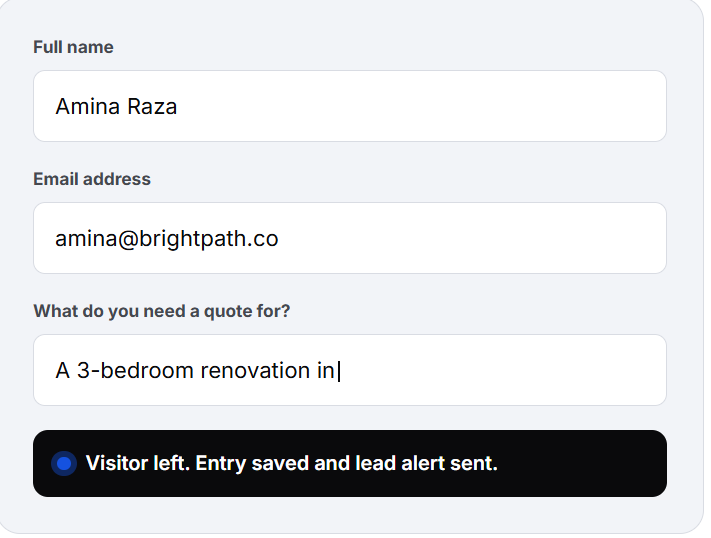
Most visitors who start a form do not submit it. This plugin shows how many forms are started, in progress, abandoned and completed — and emails your team when a visitor leaves one unfinished.
You choose Minimal or Full capture. Data stays in your own WordPress database. No subscription, no external account, and no form data is sent to TechXaro or to an AI service.
THE PROBLEM
Every site loses people before the submit button
Say 10,000 people visit your site. 500 start a form and 200 submit it. The other 300 disappear — and without tracking, you cannot see them.
Your team never hears about visitors who typed their details and stopped. If you pay for traffic, those unfinished forms are part of what you paid for.
Abandoned Form Recovery turns those drop-offs into entries you can review, so you know which forms lose people, when, and where they came from.
HOW IT WORKS
Every form tracked from start to finish
Each form follows one lifecycle: started → in progress → abandoned or completed.
01
Turn it on yourself
The plugin captures nothing after install. You enable tracking in Settings and choose Minimal or Full capture mode.
02
Progress is saved and abandonment is detected
While a visitor fills in a form, progress is autosaved at the interval you set. If they leave the page or stay inactive past the timeout you set, the entry is marked abandoned. Validation errors and failed submissions are detected in the browser, so a form cancelled by validation is not wrongly marked completed. Very fast submissions are still recorded as completed.
03
You review and follow up
Open the entry in your dashboard, or get an email alert for an abandoned form, a new submission, or repeated abandonments.
FEATURES
What the plugin does
Lead recovery, a form activity dashboard and privacy controls in one plugin.
Lead recovery
Capture the entry, detect the drop-off and put it in front of your team. Full mode stores permitted field values for recovery. Minimal mode stores only which fields were filled and the form status — never the typed values, in the browser or on the server.
Autosave form progress
As visitors type, at an interval you choose. The default is 2 seconds.
Automatic abandonment detection
Fires on page unload, tab close or inactivity timeout.
Any HTML form
Generic tracking works on any standard form, including ones built outside the major form plugins.
Email notifications
Email alerts for abandoned forms, new submissions and repeated abandonments.
Entries table with filters
Search, filter, sort and bulk delete entries.
Dashboard and entries
Review started, in progress, abandoned and completed entries in one place
Daily activity chart
A daily chart comparing started, completed and abandoned sessions, plus an activity timeline.
Device and date filters
Filter by device (desktop, mobile, tablet) and date range.
Entry details
Open an individual entry to see captured fields and session details, including the landing page and UTM source, medium and campaign.
Privacy and security
- Off by default. Nothing is captured until you switch tracking on.
- Consent controls. Require consent before progress is saved, or set rules by page path: always require on some pages and exempt others. Write your own consent message. GDPR mode always asks for consent. The banner appears when a visitor focuses a field, before typing.
- If a visitor declines, tracking stops for the rest of that tab session, including on exempt forms. Data already sent before the decline is not deleted.
- Field safeguards. Password, hidden and file upload fields are skipped automatically. Card fields, security codes, OTPs and similar sensitive fields are also excluded in the browser before anything is sent. Health, salary/income and notes/comments fields are excluded only when you enable those exclusion rules. Review your form fields and exclusion settings before enabling Full mode — safeguards cannot identify every sensitive field on every form.
- Encryption at rest. Stored field values are encrypted with AES-256 when OpenSSL is available on your server. If encryption is unavailable or fails, values may be stored unencrypted, so check your server setup.
- Browser storage. Progress may be kept in the visitor’s browser while they fill in a form, and a temporary local copy can help recover after a crash. That copy is removed after completion. See the Privacy Policy for details.
- IP addresses are stored only if you enable it, and never in Minimal mode.
- Data retention. Delete entries automatically after days, weeks, months or years you choose. The default is 90 days. You can also keep entries indefinitely.
- Data stays on your site. Entries are stored in your own WordPress database. The plugin does not send form data to TechXaro or to an AI service.
- Privacy Policy screen in the plugin shows your current settings and suggested disclosure wording.
- Uninstalling deletes the plugin’s tables, options and scheduled tasks. Deactivating keeps your data.
INTEGRATIONS
Works with the form plugins you already use
Generic tracking covers any standard HTML form. These builders also report completed submissions to the plugin directly:
Works with 8 form builders and any HTML form. All product names are trademarks of their respective owners. This plugin is not affiliated with or endorsed by them.
INTEGRATIONS
Contact Form 7
WPForms
Gravity Forms
Fluent Forms
Ninja Forms
Formidable Forms
Elementor Pro Forms
Bricks Forms
INSTANT NOTIFICATIONS
Email alerts for your team — not to the visitor
Choose which alerts go to your admin email:
- Abandoned forms — a visitor abandoned a form, with form name, fields filled (x of y), page and a link to the entry
- New submissions — a new lead was submitted
- Repeated abandonments — the same form is abandoned again and again, once it passes the threshold you set (1–100)
Send a test email from Settings to check your WordPress email is working.
FAQ
Quick answers.
Does it work with my form plugin?
Generic tracking works with any standard HTML form. Contact Form 7, WPForms, Gravity Forms, Fluent Forms, Elementor Pro Forms, Ninja Forms, Formidable Forms and Bricks Forms also report completed submissions to the plugin directly.
Do I need to turn tracking on?
Yes. Tracking is off by default. Nothing is captured until you enable it in Settings and choose Minimal or Full mode.
Does it store what visitors type?
Full mode stores the values visitors type, where permitted. Minimal mode stores only which fields were filled and the form status — never the typed values. Review your capture, consent and exclusion settings to confirm what is stored on your site.
Are passwords and card numbers captured?
Not by default. Password, hidden and file upload fields are skipped, and card details and other sensitive fields are excluded in the browser before anything is sent. You can add exclusion rules for health, salary/income and notes/comments fields. Review your forms and exclusions before you enable Full mode.
What happens when I uninstall it?
Deleting the plugin removes its database tables, options and scheduled tasks. Deactivating the plugin keeps your data.
Does it send my form data anywhere?
No. Data is stored in your own WordPress database. The plugin does not send form data to TechXaro or to an AI service.
PRICING
Free to use
The plugin is free to download and use. No subscription or external account is required.
Free for any WordPress site.
- Track started, in progress, abandoned and completed forms
- Capture partial entries in Minimal or Full mode
- Form activity dashboard with daily chart, device and date filters
- Entries list with search, filters, sort and bulk delete
- Landing page, UTM source, medium and campaign details
- Consent, exclusion and encryption controls
- Data retention settings
- Email notifications for abandoned forms, new submissions and repeated abandonments
- Works with 8 form builders and any HTML form
- Requires WordPress 5.8+ and PHP 7.4+. Tested up to WordPress 7.1.